Adding Strava to Your Portfolio
February 20, 2026•2 min read
I love coding, but I also love touching grass. I wanted a way to show off my recent rides and all-time stats directly on my personal site without manually updating them.
The Problem
Strava's API uses OAuth 2.0. That means you need an access token, but they expire quickly. Constantly generating new tokens manually is a pain.
The Fix
We need a refresh token that never expires (if used correctly) to automatically grab a fresh access token whenever our site builds or a user visits the page.
First, create an API application in your Strava API Settings.
Grab your Client ID and Client Secret.
To get that elusive first refresh token, I built a quick Node script. Run this locally, follow the
prompts, and grab your permanent STRAVA_REFRESH_TOKEN.
const https = require('https');
const readline = require('readline');

// First URL to visit to authorize your local script
const authUrl = \`https://www.strava.com/oauth/authorize?client_id=\${clientId}&response_type=code&redirect_uri=http://localhost&approval_prompt=force&scope=read,activity:read_all\`;

console.log('Open this URL, authorize, and copy the "code" from the redirect URL.');

// After pasting the code back into the terminal:
const req = https.request({
    hostname: 'www.strava.com',
    path: '/oauth/token',
    method: 'POST',
    headers: { 'Content-Type': 'application/json' }
}, (res) => {
    // Parse response for refresh_token!
});

req.write(JSON.stringify({
    client_id: clientId,
    client_secret: clientSecret,
    code: code,
    grant_type: 'authorization_code'
}));
req.end();
Drop the Client ID, Client Secret, and Refresh Token into your .env file.
Now, let's write the actual API wrapper in our Next.js project. We'll hit the token endpoint first to get a short-lived access token, then fetch the stats.
const TOKEN_ENDPOINT = 'https://www.strava.com/oauth/token';
const ACTIVITIES_ENDPOINT = 'https://www.strava.com/api/v3/athlete/activities';

const getAccessToken = async () => {
  const body = JSON.stringify({
    client_id: process.env.STRAVA_CLIENT_ID,
    client_secret: process.env.STRAVA_CLIENT_SECRET,
    refresh_token: process.env.STRAVA_REFRESH_TOKEN,
    grant_type: 'refresh_token',
  });

  const response = await fetch(TOKEN_ENDPOINT, {
    method: 'POST',
    headers: {
      'Content-Type': 'application/json',
    },
    body,
  });

  return response.json();
};

export const getStravaActivities = async () => {
  const { access_token } = await getAccessToken();

  return fetch(\`\${ACTIVITIES_ENDPOINT}?per_page=5\`, {
    headers: {
      Authorization: \`Bearer \${access_token}\`,
    },
    // Next.js App Router cache options
    cache: 'no-store',
  });
};
You can now call getStravaActivities() right from your server components and render out your most
recent rides or runs. No manual updates required.
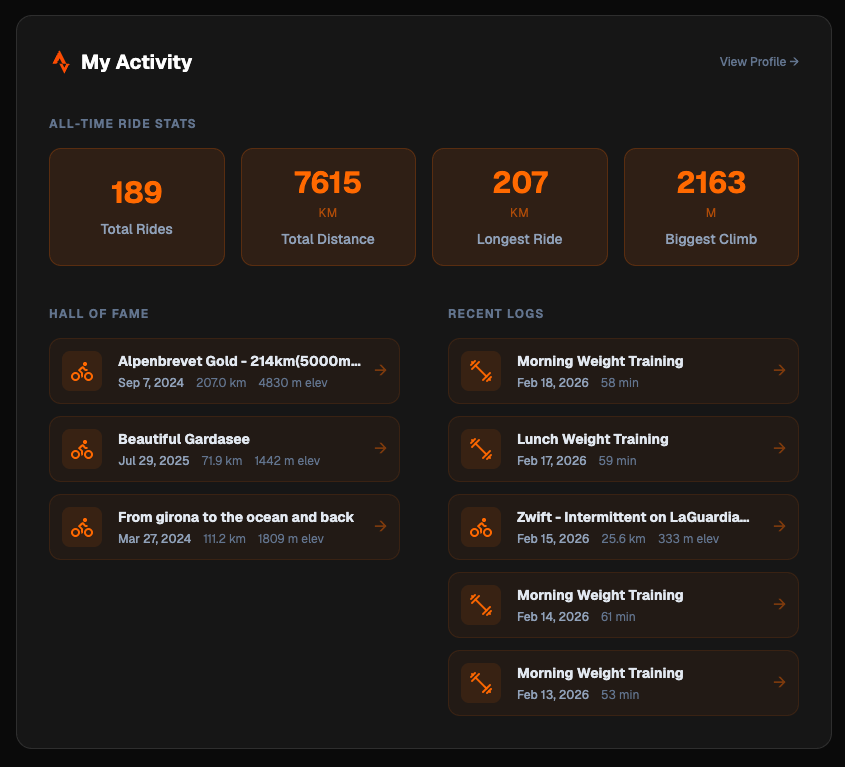
Build your UI, deploy, and go outside. Your dashboard updates itself while you're grinding out miles.
If you add this to your portfolio, share it with me on X @yhabibf. I want to see your setup.